SAML OIDC Bridge

I am platform engineer, building and implementing highly efficient developer platforms and DevOps workflows for high velocity software delivery.

The purpose of this blog is to explain and demonstrate bridging of saml to openid auth flows.
The requirement arises through the need of enabling applications which natively support openid but the IDP is only SAML compatible. This becomes a challenge when implementing Single Sign On auth, and due to regulatory needs we can have one source of truth, for user auth across the organisation. No native auth flow or user collection must be build scoped within the app to bypass the SSO.
Though due to limitation of only SAML support, we cannot straight away implement such SSO auth flows.
One way of doing this is a broker/bridge mechanism.
Overview
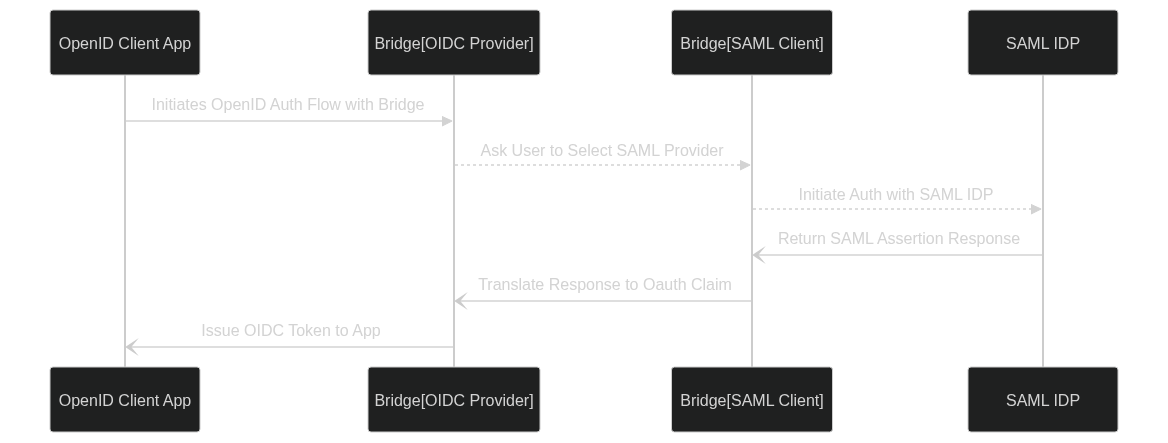
SAML to OIDC Bridge is layering an IDP over another.
The Bridge acts as both IDP and SP to delegate and translate auth flow cross protocol.
On the IDP end it serves OIDC/Oauth2 protocol.
On the SP end it used SAML Client
The Bridge is configured with OIDC Auth Details.
The OpenID client id and client key is used by app to authenticate with bridge oidc provider.
The OIDC provider uses PKCE to secure the client auth in additional to client id and secret.
It ensures that the client using the user tokens is the same as the one that has requested them.
Flow:
The a user on client app asks for login.
They are redirected to SAML IDP selection on bridge.
Upon Selection they authenticate with IDP.
On successful authentication SAML Assertion callback is made.
Bridge then inform the OIDC Provider component to issue correspondig openid credentials.
Using the openid tokens user is authenticated and authorized to access the requested resource.
Setup:
For demonstration we’ll be using a oidcdebugger.com as client service, and setup a bridge on local with a SAML IDP using Okta.
Execute the commands as follows:
git clone https://codeberg.org/drpdishant/k8s-lab.git
cd k8s-lab/saml2-oidc docker-compose up -d
# This serves the bridge at https://saml2oidc.127.0.0.1.nip.io
# The endpoints are preconfigured in Okta to work with.
Openid config endpoint will be https://saml2oidc.127.0.0.1.nip.io/.well-known/openid-configuration
Check config.json for SAML SP and OpenID Provider config.
This one has an oidc client configured with following params:
{
    "client_id": "some-client-id",
    "client_secret": "client-secret",
    "redirect_uris": [
        "https://oidcdebugger.com/debug"
    ],
    "allowedOrigins": [
        "https://oidcdebugger.com"
    ],
    "token_endpoint_auth_method": "none"
}
Use these to configure client at https://oidcdebugger.com/
Usage:
Open oidcdebugger.com
Configure The params as follows:
Authorize URI: https://saml2oidc.127.0.0.1.nip.io/auth
Redirect URI: https://oidcdebugger.com/debug
Client ID: some-client-id
Scope: openid
Response type: code
Use PKCE?: checked (SHA256)
- Token URI: https://saml2oidc.127.0.0.1.nip.io/token
Response mode: form_post
Send Request
You’ll be prompted to choose the IDP.
Choose the IDP and you’ll be sent to Okta Login Page.
Enter the following credentials:
Username: john.wick@boogeyman.com
Password: Overhung1-Celtic0-Driver3-Activate0
Upon Successful login you’ll be redirected to debug page.
